


 LinkBack URL
 About LinkBacks
Yea that's what I usually charge unless you unless your an Affiliate. I guess free is too cheap? Ok, if free is too cheap we'll barter for banner blocks or you can buy me a beer at the next conference.
You can ask the dozens of people here (and hopefully they will read this and verify this) that many private or public members have asked me to do this for them and in 99% of the cases I was eventually able to offer a few pieces of advice - REAL ADVICE.
I just cleaned my PM box out so feel free to send yours through.
Here is one I did this morning sipping me Java. [<----bad attempt at a Yank trying to sound Yorkshire]
I forgot to send this along with my response so I'll add it here; You are referring to CTR or Click Through Rate rather than your terminology; 'conversion'. I almost missed this detail until I reread the question. This can lead to getting back non-relevant information.Hi Gary,
...I was unable to attend the conference in Dublin, much to my regret, and would have liked to have had a session with you regarding my xxxxxxxxx.com site. It has been active for almost 3 years, and has never brought in consistent traffic. Over the last 2 weeks, visits to my site have trickled down to almost nothing. Several people have inspected the my website and can find nothing that could be the cause of such a low conversion rate.
I was wondering how much you would charge for a one-on-one look at my site and possible ideas for optimization?
Please be aware that there is A TON of misinformation out there. This can come from incorrect terminology or more often just plain incorrect advice, whether intended or not. I can name 4 top sites that are full of it (in some cases literally).
I'm not right 100% of the time but I tend to test things or talk to the right people if I can't provide an answer, if anything to find out the answer myself.
Hi Xxxx,
Sorry for the late response. I had 4 additional conferences after Dublin (including A4U in Munich) so I have been on the road for 2 months, but thankfully I am done until Barcelona in Sept.
Give me a few days and I'll have my team give it a quick look.
What are your target geographic targets?
Cheers
Gary Beal
I decided to have a look
Hi Xxxx,
Some quick tips I saw after a brief look;
1. Change the 302's to 301's that you have on your affiliate links (e.g.neteller and moneybookers.com). Read through this thread (currently ongoing - good timing on your part eh?)
2. Remove or replace Clickandbuy.com. Its a double off-site redirect
3. To safe replace your 302's going to the max ads pro WP plugin to 301 or tiny.url's
4. Go to Webmaster Central and look for site errors. There are a few 404's (e.g. /lucky-live.php)
5. Your primary page exists with and without caps (xxxxxxxxx.com vs XxxxxXxxxxx.com) use a 301 from the caps to the non-caps version
6. Personally I think you have stuffed your titles and are diluting their purpose. Remove unnecessary words from the title pages on your 1st directory
7. Either use keyword meta tags or don't, but if you do make them unique. You can use a plugin via wordpress that will create these for you and some think even though google doesn't use them that it can't hurt, and may possible be an algorithmic value for other engines.
8. MAJOR ISSUE - you have multiple home/index pages showing. Websites can have more than one URL. (e.g. http://www.bluewidgets.com and http://www.bluewidgets.co.uk). If you have been around for a while and people are linking to you they could be linking to either URL. By designating a primary it gets 100% of the above benefits. Go to Google's Webmaster Central and in the tools section designate one as your primary. Do a 301 redirect on the non-primary page to pass on any backlink juice, PR and authority that the page has to the primary page. Internal navigation needs to be checked to be sure all links go to the correct version as well. Bad navigation is common, especially with websites constantly being populated or worked on by many individuals. Pick one and use it throughout.
There are probably more but I stopped after being able to reach the 3 most obvious;
www.xxxxxxxxx.com
http://www.XxxxXxxxx.com
www.xxxxxxxxx.com/index.php
www.xxxxxxxxx.com/index
Even though they do not show individually in a google search query, i can still see and therefor reach them, so I expect robots can as well (well, I KNOW they are).
You are splitting backlink influence as well. Again I only guessed 2 URL's, but this is what I found;
www.xxxxxxxxx.com - 359 back links
www.xxxxxxxxx.com/index.php - 266 back links
I talk about another issue with this here - SEO canonicalisation
9. H2 Tags - Every H2 tag on your site is LIVE CASINO GAMES or LIVE CASINO REVIEWS. Optimise your top pages with unique H2's and remove the others
10. Not one of your images has a title or alt tag on them. These are important and can be used to target long tail terms.
I'll stop there, but this is enough. Fix these issues, add all the keywords that you add throughout the site to www.RankMaster.co.uk. (You can identify the long tail terms using google suggest, external keywords tool or the keyword tool in your Adwords account if you have one)
Good luck and let me know the results.
Cheers
GaryTheScubaGuy
Results 1 to 20 of 31
Thread: £4000 for an SEO analysis?
-
16 June 2011, 2:11 am #1
 In Memorium, 1966-2018

- Join Date
- December 2008
- Location
- Malta
- Posts
- 745
- Blog Entries
- 22
- Thanks
- 223
- Thanked 430 Times in 205 Posts
 £4000 for an SEO analysis?
GaryTheScubaGuy
£4000 for an SEO analysis?
GaryTheScubaGuy
-
16 June 2011, 5:04 am #2
 Private Member
- Join Date
- January 2010
- Posts
- 5,096
- Thanks
- 432
- Thanked 2,333 Times in 1,555 Posts
I have a quick question for you that I've never been clear on (although I've not really had the need to use it before)

When using rel=canonical can the tag also be in the page that you're specifying as the preferred version (ie: can the page specify itself), or does the target page need to not have the tag? (eg: the tag is only in pages which are not the preferred URL)
So if the preferred URL is:
/search?keyword
can the tag be put into :
/search?keyword
as well as:
/search?keyword&order=alpha
/search?keyword&filter=optiononlinegamblingwebsites.com - Formally known as goodbonusguide.
Gambling Domains: Small clear out of some of the domains we've been hoarding - see the spreadsheet here.
-
16 June 2011, 6:45 pm #3
Private Member
- Join Date
- March 2002
- Location
- New Zealand
- Posts
- 2,404
- Blog Entries
- 1
- Thanks
- 574
- Thanked 469 Times in 243 Posts
Hi Gary
I sent you a pm on the 12 May which you never responded too.
it may have slipped through the cracks...but maybe you can help me with my question as I am still stumped:
Help with something I picked up on Screaming Frog
Hi Gary
Firstly I would like to mention that I enjoyed your latest report regarding SEO!!
I also have a question I would really appreciate your help with, as I am tearing my hair out!!
I went to screaming frog as suggested and I came across something strange! You can see for yourself on screaming frog regarding our site www.onlinecasino.co.za , you will see 2 x www.onlinecasino.co.za url's??
1 shows level 2, in links 309, out links 76.... the 2nd shows
level 0, in links 4, out links 81 ( it looks like google shows these as 4 backlinks )
Beats me where it's picking up the two urls, I assume that I need to delete the url with the lowest in links?? but where??
The only other thing I assume is that the sites I.P address is reflecting as one of the www's
Can you advise or assist with this, I know you are busy and understand if can't at this point in time!
Regards
HeatherOnline Casinos| SA Casinos | Best Online Casinos | Rand Casinos | Online Slot | Online Casinos | Best Slots Games
Follow Us on Twitter
-
16 June 2011, 8:29 pm #4
In Memorium, 1966-2018
- Join Date
- December 2008
- Location
- Malta
- Posts
- 745
- Blog Entries
- 22
- Thanks
- 223
- Thanked 430 Times in 205 Posts
SEO Tips - Canonicalistion
Hi Heather,
Sorry I missed the question.
A directories default file (eg index.html, index.php) or for a domain name, has a trailing slash. Without it the Apache web server (which you probably have powering your website) causes a search and an internal redirect to be made to find and link to the actual resource.
Severs running IIS/Microsoft has the same handling. When a browser requests a URL such as http://www.servername.com/SubDir, the browser is redirected to http://www.servername.com/SubDir/. A trailing slash is included at the end of the URL
When Screaming From hits the site its using no trailing slash (which is why it is showing up first).
As to why the internal/external links are varied, I don't know. When I did a quick search this is what I found;
WEBSITE WITHOUT TRAILING SLASH
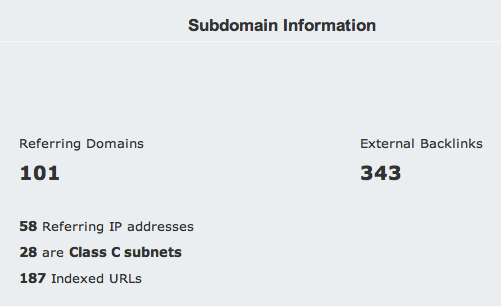
WEBSITE WITH TRAILING SLASH
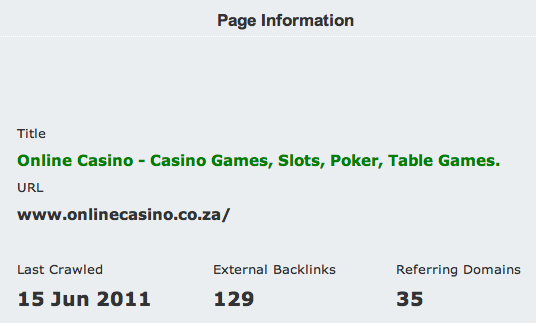
Robots are seeing 2 domains; one with http and one without, and are treating it as a subdomain.
It could also come from people linking back to your site with both url's (like you did above).
I believe the reason you are seeing two different sets of results is because the actual links back to your site may or may not include the trailing backslash.
I think since Google sees it correctly though but you will need to check this through webmaster central and verify the number of links they are seeing and let me know what you see.
Here are different ways you can resolve this. You can do one or all. I would do all where possible.
Set your preferred domain
Setting your preferred domain tells Google which version of your site's URL (http://www.example.com or http://example.com) you prefer.
If you set your preferred domain as http://example.com, we'll treat links to http://www.example.com exactly the same as links to your preferred domain.
To set the preferred domain for a site, click Site configuration, and then click Settings. In the Preferred domain section, pick the option you prefer.
If you want www.onlinecasino.co.za to be the canonical URL for your listing, you can indicate this to search engines by adding a <link> element with the attribute rel="canonical" to the <head> section of the non-canonical pages. To do this, create a link as follows:
<link rel="canonical" href="www.onlinecasino.co.za">
Add this extra information to the <head> section of non-canonical URLs.
Use 301 redirects
If a page can be reached in multiple ways—for instance, http://example.com/home, http://home.example.com, or http://www.example.com—it's a good idea to pick one of those URLs as your preferred (canonical) destination, and use 301 redirects to send traffic from the other URLs to your preferred URL. A server-side 301 redirect is the best way to ensure that users and search engines are directed to the correct page. The 301 status code means that a page has permanently moved to a new location.
To implement a 301 redirect for websites that are hosted on servers running Apache, you'll need access to your server's .htaccess file. (If you're not sure about your access or your server software, check with your web host.) For more information, consult the Apache .htaccess Tutorial and the Apache URL Rewriting Guide. If your site is hosted on a server running other software, check with your host for more details.
Indicate your canonical (preferred) URLs by including them in a Sitemap
Pick a canonical (preferred) URL for each of your product pages, and tell us about your preference by submitting these canonical URLs in a Sitemap.Last edited by GaryTheScubaGuy; 16 June 2011 at 9:20 pm.
GaryTheScubaGuy
-
16 June 2011, 9:23 pm #5
In Memorium, 1966-2018
- Join Date
- December 2008
- Location
- Malta
- Posts
- 745
- Blog Entries
- 22
- Thanks
- 223
- Thanked 430 Times in 205 Posts
Why would you do this? I would just use absolute rather than relative links in your code if this is why. Originally Posted by baldidiot
 GaryTheScubaGuy
-
17 June 2011, 2:05 am #6
Private Member
- Join Date
- March 2002
- Location
- New Zealand
- Posts
- 2,404
- Blog Entries
- 1
- Thanks
- 574
- Thanked 469 Times in 243 Posts
Gary
Thank You so much for taking the time to look at my site.
Let me read and digest everything you have written and if I have any questions I will post it here.
Thanks again. You have been a great help!Online Casinos| SA Casinos | Best Online Casinos | Rand Casinos | Online Slot | Online Casinos | Best Slots Games
Follow Us on Twitter
-
17 June 2011, 3:48 am #7
Private Member
- Join Date
- January 2010
- Posts
- 5,096
- Thanks
- 432
- Thanked 2,333 Times in 1,555 Posts
Oh I was just being lazy and didn't write the www Originally Posted by GaryTheScubaGuy
 The absolute URL would be used.
Essentially I was asking if this tag:
<link rel="canonical" href="http://www.example.com/search?keyword" />
can go into this page:
http://www.example.com/search?keyword
Or should a page not specify itself in the canonical tag?onlinegamblingwebsites.com - Formally known as goodbonusguide.
Gambling Domains: Small clear out of some of the domains we've been hoarding - see the spreadsheet here.
-
17 June 2011, 5:10 am #8
In Memorium, 1966-2018
- Join Date
- December 2008
- Location
- Malta
- Posts
- 745
- Blog Entries
- 22
- Thanks
- 223
- Thanked 430 Times in 205 Posts
I was asking why would you even need a canonical pointing back to itself?
GaryTheScubaGuy
-
17 June 2011, 5:24 am #9
Private Member
- Join Date
- January 2010
- Posts
- 5,096
- Thanks
- 432
- Thanked 2,333 Times in 1,555 Posts
For server generated pages which are controlled by the same script - eg: the preferred URL is created by the same code as the non preferred version. So any code I put in the head of the non preferred version would also be in the head of the preferred version. Hence trying to find out if it would be a problem. Originally Posted by GaryTheScubaGuy
Lets say my search script returns URL's like:
http://www.example.com/search?keyword
But it can also return them as:
http://www.example.com/search?keyword&order=alpha or
http://www.example.com/search?keyword&order=hits or
http://www.example.com/search?keyword&order=rating
Essentially these are all the same page just with a different ordering, so the preferred url would be without the additional paramenters. But putting the tag in is kind of an all or nothing deal.onlinegamblingwebsites.com - Formally known as goodbonusguide.
Gambling Domains: Small clear out of some of the domains we've been hoarding - see the spreadsheet here.
-
19 June 2011, 8:43 am #10
Public Member
- Join Date
- June 2011
- Location
- Scotland, UK
- Posts
- 30
- Thanks
- 0
- Thanked 6 Times in 5 Posts
Great advice again Gary. I have some leaks I need to fix today
~ Paul
-
19 June 2011, 8:50 am #11
In Memorium, 1966-2018
- Join Date
- December 2008
- Location
- Malta
- Posts
- 745
- Blog Entries
- 22
- Thanks
- 223
- Thanked 430 Times in 205 Posts
Hi Mate (I can't bring myself to call you bald idiot)
This is a bit confusing for me to understand, and Google too.
This is where absolute URL's come in to play and xml sitemaps.
As I suggested a few days back you need to use absolute referrers.
Unless I am still missing something.
Cheers
GaryGaryTheScubaGuy
-
19 June 2011, 11:22 am #12
In Memorian, 1964-2016
- Join Date
- January 2009
- Location
- England
- Posts
- 322
- Thanks
- 51
- Thanked 75 Times in 63 Posts
Hi Baldidiot
I think what you are trying to do is the exact thing that Google set up the canonical tag for, see their example here:
http://googlewebmastercentral.blogsp...canonical.html
So the <link rel="canonical" href="http://www.example.com/search?keyword" /> is in the <head> of *all* the pages (i.e. including all your ?order=blah variants as well as the canonical page itself's <head>) then that is the right thing to do. If I understand both the google example and what you are trying to do!
Let the thread know if I have got the wrong end of the stick.
-
19 June 2011, 12:26 pm #13
Public Member
- Join Date
- July 2004
- Posts
- 893
- Thanks
- 239
- Thanked 406 Times in 226 Posts
That's how I have mine set up. Essentially, because it goes in the HEAD of a dynamic script it will appear in all variations including the "correct" one by default. Originally Posted by RayUK
PS @Gary: Thanks for sharing.
-
19 June 2011, 12:34 pm #14
In Memorian, 1964-2016
- Join Date
- January 2009
- Location
- England
- Posts
- 322
- Thanks
- 51
- Thanked 75 Times in 63 Posts
Good point - Gary, didn't mean to jump into your thread like that! I sort of found baldidiot's post in the new post thing (yeah bad of me for not reading back). Thanks for all your postings here as well as this thread, it is much appreciated.
-
19 June 2011, 12:39 pm #15
Public Member
- Join Date
- June 2011
- Location
- Scotland, UK
- Posts
- 30
- Thanks
- 0
- Thanked 6 Times in 5 Posts
I use Wordpress and (more recently) the Ultimate SEO Plugin and it does all of that stuff for you, so I've never been overly concerned about the canonical URL, but after reading this I can see why it's important if you're using a CMS or shopping cart that throws out a bunch of dynamic URLs...
~ Paul
-
20 June 2011, 10:41 am #16
Private Member
- Join Date
- January 2010
- Posts
- 5,096
- Thanks
- 432
- Thanked 2,333 Times in 1,555 Posts
Cool, thanks all
onlinegamblingwebsites.com - Formally known as goodbonusguide.
Gambling Domains: Small clear out of some of the domains we've been hoarding - see the spreadsheet here.
-
24 June 2011, 6:52 pm #17
Private Member
- Join Date
- January 2008
- Location
- Texas
- Posts
- 101
- Thanks
- 53
- Thanked 15 Times in 14 Posts
Gary,
Thank you so very much for your expert advice! I am in the process of making the changes and will let you know how it all goes.
Thanks again for taking time out of your busy schedule and for helping this struggling affiliate!JaqiC
CasinoChimp - Live Dealer Casino Review
Live-Roulette-UK - Resource for live dealer roulette
www.Live-Blackjack-UK - Resource for live dealer blackjack
Follow CasinoChimp on Twitter
"Shoot for the moon, even if you miss, you'll land amongst the stars.." Les Brown
-
The Following User Says Thank You to JaqiC For This Useful Post:
GaryTheScubaGuy (24 June 2011)
-
24 June 2011, 11:05 pm #18
In Memorium, 1966-2018
- Join Date
- December 2008
- Location
- Malta
- Posts
- 745
- Blog Entries
- 22
- Thanks
- 223
- Thanked 430 Times in 205 Posts
Canonicalizations, 301's and server settings update
Hi All, (and thanks to JaqiC for the public thank you!)
I wanted to add something to this thread before going on because based on PM's and posts I can see this is an issue for many. Plus I forgot to add the actual IP to the list of redirects.
On a side note Google can probably see and resolve many of these instances, but for me just like using keywords in the meta, if it doesn't hurt to do then I am doing it. (and by the way I have done considerable testing on both canonicals, 301's, keywords and have not seen the slightest issue with Google. In fact on a few tests 3rd party sites showing improved rankings (Yahoo, Dogpile, etc.)
Depending on what type of hosting you have this is a very easy fix. Because most Affiliates I know are in gaming and are portal sites canonicalization is of little concern (but still important if you have external links pointing to more than one) but anyone using xml or other types of feeds that use dynamic URL's really need to use this, as well as the previously mentioned 'absolute' linking structure and canonicals.
Anyhow here are specific instructions I gave someone awhile back that outline specific setups;
301 Redirects & Canonical Redirects for Apache
This is done on the invisible file named ".htaccess" this file is located in the root of your Web Server.
For a single page redirect (NEVER use a 302 make sure it says either "Permanent" or "301" in the file if it doesn't it will pass a 302 by default:redirect 301 /old-file-name-html http://www.yourdomain.com/new-file.htmlNotice all that is needed is one space between the old path and the new URL. The new URL must contain an Absolute URL: meaning it uses http://www.yourdomain.com/yourfile.html. If there is a space in the file name use %20 otherwise it will not work, you can only leave one space and that is between the old file path and the new url. Here is an example:
or
redirect permanent /old-file.html http://www.yourdomain.com/new-file.html/old%20file.html http://www.yourdomain.com/new-file.htmlApache Server Canonical Redirect
(non-www to www):
This should always be done as some search engines do not properly understand the difference and may count it as a duplicate page, additionally if you use domain.com/index.html or domain.com/index.php the Search Engine might get lost. Since Google is the most popular Search Engine, it also happens to be a bit archaic in its handling of canonical issues and redirects. What Google will see as the same page duplicated on your site (In reality its all the same page).domain.comSince Google favors penalties over relative content you need to make sure you NEVER link to your home page as "index.html" or any other file extension. The automated factors of the Google algorithm would hurt your rankings without warning assuming that you have a higher potential of spam from duplicate content. Google generally does not notify webmasters of penalties, so you could be spending years trying to resolve an issue like this. Make all your links Absolute (Full URL) at least to your home page, so any link on your site should always link to "http://www.yourdomain.com/" be sure to use the trailing slash as some servers will pass a redirect to the trailing slash if you do not, and this will be a 302 redirect. This is a known issue on WebStar Server, an old Mac Platform web serverthat has no redirect capabilities.
domain.com/
www.domain.com/
www.domain.com
domain.com/index.html
www.domain.com/index.htmlALWAYS:Now for the .htaccess canonical redirect for the NON-www. to the www.
<a href="http://www.yourdomain.com/">
NEVER:
<a href="http://www.yourdomain.com/index.html"> -Not direct to the domain.
<a href="http://www.yourdomain.com"> - No Trailing Slash
RewriteEngine OnA More advanced version will even allow you to 301 your IP address and any subdomains:
RewriteCond %{HTTP_HOST} ^domain\.com
RewriteRule (.*) http://www.domain.com/$1 [R=301,L]
NOTE: Some Versions of Apace require an extra line or two of code for SymLinks and a different structure of the rewrite rule as follows:
RewriteEngine On
Options +FollowSymlinks
RewriteBase /
RewriteCond %{HTTP_HOST} ^domain\.com$ [NC]
RewriteRule ^(.*)$ http://www.domain.com/$1 [R=301,L]RewriteEngine OnThe above code will 301 your non-www to your www, as well as redirect your IP address as a 301 to your www.
RewriteCond %{HTTP_HOST} .
RewriteCond %{HTTP_HOST} !^www\.domain\.com
RewriteRule (.*) http://www.domain.com/$1 [R=301,L]
For IP Redirection Use:RewriteCond %{HTTP_HOST} ^12\.34\.567\.890To redirect your http pages but NOT your https pages use:
RewriteRule (.*) http://www.domain.com/$1 [R=301,L]
Say for instance, your secure certificate was not created as www.domain.com, but was instead issued as domain.com then you would need to use the following and be sure to combine this with ABSOLUTE links (absolute links use the full URL), or you may unintentionally cause duplicate https and http paths.RewriteCond %{SERVER_PORT} ^80301 Redirects & Canonical Redirects:
RewriteCond %{HTTP_HOST} ^domain\.com
RewriteRule ^(.*)$ http://www.domain.com/$1 [R=301,L,QSA]
Microsoft IIS Web Servers
To Perform this you need administrative access to the IIS Server Application. If you do not have this then you can do the redirects in ASP or PHP.
Single Page Redirect:
- Open Internet Services Manager then "right-click" on the file or folder you want to redirect to a new page or folder.
- Select "redirection to a URL".
- Enter the URL where you want the redirect to go to.
- Check the fields: "exact url entered above" and "A permanent redirection for this resource".
- Click "Apply".
PHP 301 Redirect
This is added to the page that you want to redirect to a new page, it is triggered on the request for the specific page and the file will actually return the redirect.
Single Page Redirect:PHP Canonical Redirect:
(non-www to www)<?phpRedirects & Canonical Redirects for Active Server Pages (ASP)
if (substr($_SERVER['HTTP_HOST'],0,3) != 'www') {
header('HTTP/1.1 301 Moved Permanently');
header('Location: http://www.'.$_SERVER['HTTP_HOST']
.$_SERVER['REQUEST_URI']);
}
?>
Single Page Redirect:
This is placed on the page you are redirecting and is triggered when someone tries to access the page.<%@ Language=VBScript %>ASP Canonical Redirect:
<%
Response.Status="301 moved permanently"
Response.AddHeader "Location", "http://www.domain.com/"
%>
(non-www to www):
This code should be inserted into a global include file or any script which is executed for every page on the site before the page output begins. If your programmers are using ASP.net and/or they are not using a global file, you need to have them address this issue or perform the Canonical Redirect from the IIS Server Application (as above).<%301 Redirects for ASP.NET
If InStr(Request.ServerVariables("SERVER_NAME"),"www" ) = 0 Then
Response.Status="301 Moved Permanently"
Response.AddHeader "Location","http://www."
& Request.ServerVariables("HTTP_HOST")
& Request.ServerVariables("SCRIPT_NAME")
End if
%>
For Single Pages:
<script runat="server">
private void Page_Load(object sender, System.EventArgs e)
{
Response.Status = "301 Moved Permanently";
Response.AddHeader("Location","http://www.domainname.com/new-page.aspx");
}<...
Canonical Redirect for ASP.NET (ASPX):
For ASP.NET you need to do this individually in the Windows IIS Internet Services Manager or Use The ASP Code above in a global file that wil process the redirect BEFORE any other processes.
301 Redirects for Macromedia ColdFusion
Since cold fusion is usually hosted on Windows, Linux, and Sun. The .htaccess and Windows IIS tutorials above will have solutions for the Canonical and redirects. This is for a Single Page Redirect embedded directly into the file:<cfheader statuscode="301" statustext="Moved permanently">
<cfheader name="Location" value="http://www.new-location.com/">
301 Redirects for Sun Web Servers
In order to do this on a SUN platform you have to rewrite the SUN Web Server's standard action of always using a 302 redirect to always use a 301 redirect. You have to open the obj.conf configuration file and add the following lines below the <Object name="default"> line:<Client code="302">The above will make the SUN web server to return 301 permanent redirect responses for all redirects. If you only want to use a 301 permanent redirect response for certain URLs or files, you can add following to the bottom of obj.conf:
Output fn="set-variable" error="301" noaction="true"
</Client><Object ppath="path">GaryTheScubaGuy
<Client code="302">
Output fn="set-variable" error="301" noaction="true"
</Client>
</Object>GaryTheScubaGuy
-
24 June 2011, 11:14 pm #19
In Memorium, 1966-2018
- Join Date
- December 2008
- Location
- Malta
- Posts
- 745
- Blog Entries
- 22
- Thanks
- 223
- Thanked 430 Times in 205 Posts
(Hey Michael, can you guys set my character limit to more than 10k? - you know how I like to run on)
(continued)
301 Redirects for ASP.NET
For Single Pages:
<script runat="server">
private void Page_Load(object sender, System.EventArgs e)
{
Response.Status = "301 Moved Permanently";
Response.AddHeader("Location","http://www.domainname.com/new-page.aspx");
}<...
Canonical Redirect for ASP.NET (ASPX):
For ASP.NET you need to do this individually in the Windows IIS Internet Services Manager or Use The ASP Code above in a global file that wil process the redirect BEFORE any other processes.
301 Redirects for Macromedia ColdFusion
Since cold fusion is usually hosted on Windows, Linux, and Sun. The .htaccess and Windows IIS tutorials above will have solutions for the Canonical and redirects. This is for a Single Page Redirect embedded directly into the file:<cfheader statuscode="301" statustext="Moved permanently">301 Redirects for Sun Web Servers
<cfheader name="Location" value="http://www.new-location.com/">
In order to do this on a SUN platform you have to rewrite the SUN Web Server's standard action of always using a 302 redirect to always use a 301 redirect. You have to open the obj.conf configuration file and add the following lines below the <Object name="default"> line:<Client code="302">The above will make the SUN web server to return 301 permanent redirect responses for all redirects. If you only want to use a 301 permanent redirect response for certain URLs or files, you can add following to the bottom of obj.conf:
Output fn="set-variable" error="301" noaction="true"
</Client><Object ppath="path">GaryTheScubaGuy
<Client code="302">
Output fn="set-variable" error="301" noaction="true"
</Client>
</Object>GaryTheScubaGuy
-
24 June 2011, 11:27 pm #20
In Memorium, 1966-2018
- Join Date
- December 2008
- Location
- Malta
- Posts
- 745
- Blog Entries
- 22
- Thanks
- 223
- Thanked 430 Times in 205 Posts
Hi All,
I wanted to take a quick minute before diving into these analysis in my PM box that over a dozen of you have sent through this past week and apologise for the delay. Between training up 2 new recruits and hiring 3 more, the endless string of inquiries from the last 6 back-to-back-conferences (EGR, Bingo Summit, Internet World, Sascon, IGB Dublin and A4U Munich), plus arranging for my 10-yr old little boy to come over from the states (YAAAAAAAAAYYY!!!!!) it has been absolutely manic over here.
I'm going to start with the first one I received and work through each them as I watch Glastonbury today - so if things get a bit muddled you'll know why in advance. (I like to live in the moment)
Additionally a publc apology is due to JaqiC; Jackie I thought I removed your URL but just noticed I missed one on one of the images I posted. I would never do this intentionally, and for those of you that requested an analysis, I won't post yours publicly so don't let that hold you back. I think the information is going to be very broad and may apply to other members that don't want to post or didn't realise a potential problem until someone else has it (as happened in the initial post from JaqiC).
I won't post your URL.
So here we go...GaryTheScubaGuy
-
The Following 2 Users Say Thank You to GaryTheScubaGuy For This Useful Post:
casinoplanet (27 June 2011), TheCanadianGambler (24 June 2011)

 Reply With Quote


 Posting Permissions