


 LinkBack URL
 About LinkBacks
I am new in the igaming affiliate sector and have one question which the answer to which I could not find in the forum, so decided to ask here.
If I am affiliating an operator who has a presence in many countries with different domains how is my affiliate tracking link gonna work? Let's say I want to partner with Netbet who has country-specific domains: netbet.ro, netbet.com, netbet.co.uk. I am interested to know if I have an affiliate link with netbet.co.uk and my website user from Romania clicks on it and automatically was redirected to netbet.ro, then will my tracking link still work or it is a lost player for me?
Thanks in advance for your help.
Results 1 to 5 of 5
Thread: GEO based link tracking
-
19 December 2019, 12:01 am #1
 New Member
- Join Date
- December 2019
- Posts
- 1
- Thanks
- 1
- Thanked 0 Times in 0 Posts
 GEO based link tracking
-
19 December 2019, 2:32 pm #2
Forum Administrator
- Join Date
- July 2003
- Location
- Courage is being scared to death...and saddling up anyway. John Wayne
- Posts
- 33,978
- Thanks
- 4,537
- Thanked 9,295 Times in 5,979 Posts

If you are using wordpress there are a number of plugins you can use to target the ads a visitor see based on their ip used while visiting your site, custom scripting the same thing on html/php sites etc is also possible, do some searching here at the GPWA there are a number of threads on the subject with a few suggestions.
As for redirecting after the visitor lands, most of the better affiliate programs will give you credit ever if the redirect the traffic to a different landing page, however I would think most of them will show the visitor stats with the campaign that was attached to the link used by the visitor, although some may define in the stats how much traffic each landing page received.
Rick
Universal4
-
The Following User Says Thank You to universal4 For This Useful Post:
Cash Bonus (19 December 2019)
-
19 December 2019, 3:17 pm #3
Former Member
- Join Date
- July 2006
- Posts
- 1,118
- Thanks
- 418
- Thanked 470 Times in 287 Posts
here is a solution for you @ OP.
Assumption: you are using Wordpress.
add this code to the top of your header.php
Code:session_start(); // <- We need this to use PHP session storage for a visitor if (!isset($_SESSION["vistor_geodata"])) { $_SESSION["vistor_geodata"] = geoLookupbyIP(get_client_ip_env()); }
go to ipstack.com and sign up for an API key (referred to below as [YOURACCESSKEY].. swap it into the snippet below then
add the code to your theme (or child theme) functions.php file
Create a new page called "visit casino" which resides at yoursite dot com/visit-casinoCode://================================================================================= function geoLookupbyIP($ip) { $url="http://api.ipstack.com/".$ip."?access_key=[YOURACCESSKEY]&format=1"; $sRes = file_get_contents($url); $aRes = json_decode($sRes, true); return $aRes; } function get_client_ip_env() { $ipaddress = ''; if (getenv('HTTP_CLIENT_IP')) $ipaddress = getenv('HTTP_CLIENT_IP'); else if(getenv('HTTP_X_FORWARDED_FOR')) $ipaddress = getenv('HTTP_X_FORWARDED_FOR'); else if(getenv('HTTP_X_FORWARDED')) $ipaddress = getenv('HTTP_X_FORWARDED'); else if(getenv('HTTP_FORWARDED_FOR')) $ipaddress = getenv('HTTP_FORWARDED_FOR'); else if(getenv('HTTP_FORWARDED')) $ipaddress = getenv('HTTP_FORWARDED'); else if(getenv('REMOTE_ADDR')) $ipaddress = getenv('REMOTE_ADDR'); else $ipaddress = 'UNKNOWN'; return $ipaddress; }
take a note of the page ID... (when editing it) we will refer to this is REDIRECTPAGEID and insert it into the following code block which will also go at the top of your functions.php
we are setting things up here so that our "visit-casino" page accepts an extra path which is used as a parameter (casino_name)Code:$ipartnerRedirectPageID= REDIRECTPAGEID ; add_filter('init','flushRules'); add_filter('query_vars', 'add_my_var'); function add_my_var($public_query_vars) { $public_query_vars[]= 'casino_name'; return $public_query_vars; } function flushRules(){ global $wp_rewrite; $wp_rewrite->flush_rules(); }
so it will be like yoursite dot com/visit-casino/888-Casino or something like that. We will know the users GEO, so we can use a lookup table to see if we have a suitable affiliate link / landing page for that specific geo. (if not we will serve our default link). We should do a lookup to see if country is in allowed countries list for merchant, but that is outside scope of this post.
anyway.. so let's set up a master lookup sheet in CSV format so that we can access it with code and store the data in a structured manner..
here's how I manage the affiliate links on 1 of my sites:
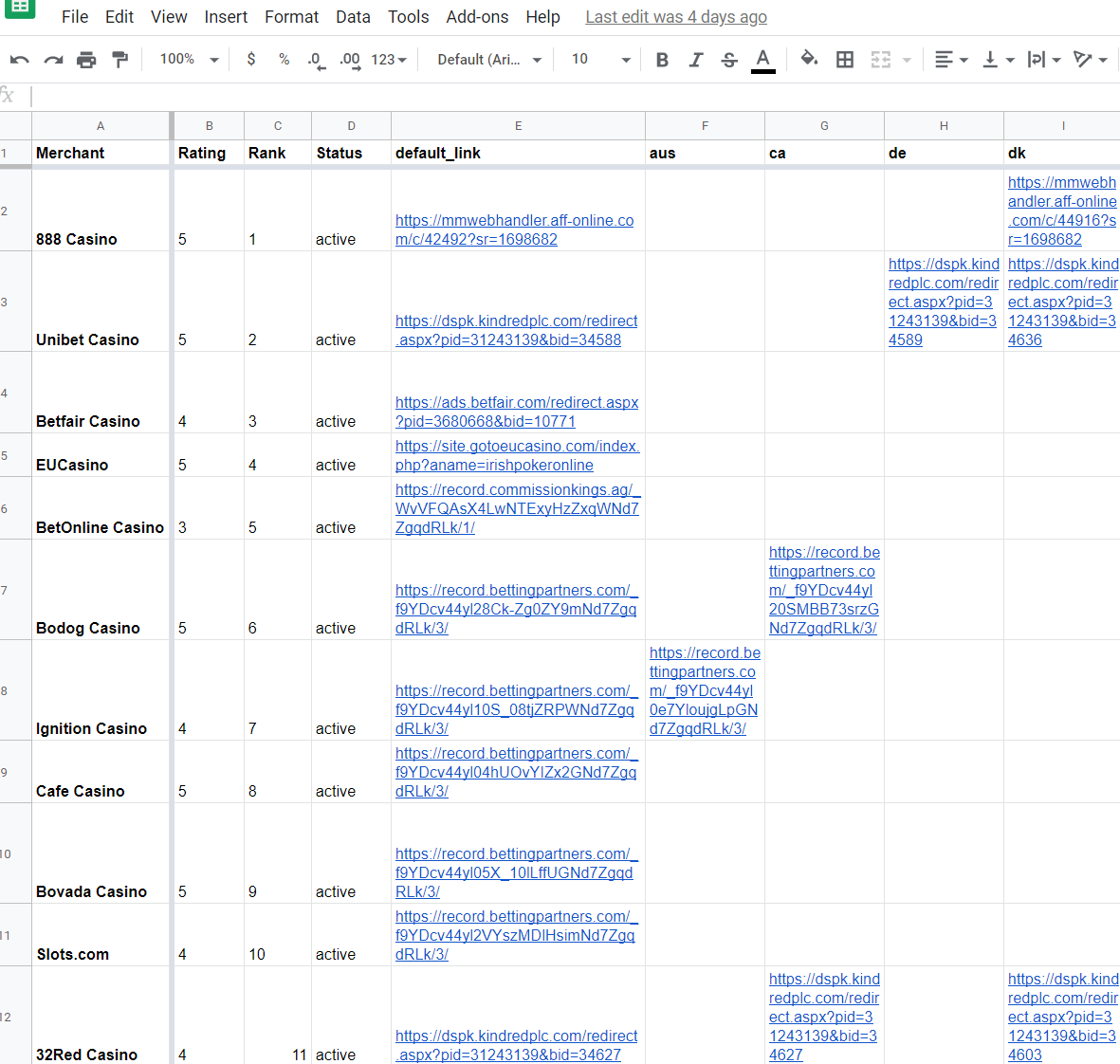
create the sheet like this, publish to the web (publish=>public on the web, this sheet only, CSV) and take a note of the CSV address.
swap it into the bit below that says 'YOUR_GOOGLE_DOCS_OR_LOCALCSV_FILE_LINK'.
Now we are almost done.. Let's create a function to accept a merchant name (to lookup, and a geo code), and which will return the appropriate link for the visitor.
put this in functions.php
Now you just need to send the visitor to the right page and the page template assigned to the visit-casino page should do the rest...Code:function getAffiliateLink($sCasinoPartner, $sCountryCode) { $sCountryCode=strtolower($sCountryCode); $sLink =null; $sURL = "YOUR_GOOGLE_DOCS_OR_LOCALCSV_FILE_LINK"; $aData = array_map('str_getcsv', file($sURL)); $aDataNew=[]; $aHeadings = []; foreach ($aData as $index=>$aRow) { if ($index==0) //header row { foreach ($aRow as $i=>$v) $aHeadings[]=$v; } else { $sMerchant= $aRow[0]; //echo $teamindex; foreach ($aRow as $i=>$v) { //echo $i.'<br/>'; if ($i!=0) { $aDataNew[$sMerchant][$aHeadings[$i]]=$v; } } } } foreach ($aDataNew as $sCasino=>$aAffiliateLinks) { if (strtolower($sCasinoPartner) === strtolower($sCasino) ) { if (isset($aAffiliateLinks[$sCountryCode])) { if ($aAffiliateLinks[$sCountryCode]!="") $sLink = $aAffiliateLinks[$sCountryCode]; else $sLink= $aAffiliateLinks["default_link"]; } else //serve default link for merchant $sLink= $aAffiliateLinks["default_link"]; } } return $sLink; }
take a note of your template path relative to your theme (or child theme root).
mine is "templates/template-partner-redirect.php".. (you will need to refer to this in a later step)
so modify your visit-casino page template (ie yourthemefolder/templates/template-partner-redirect.php) and add the following code under the call to get_header();
now we have the correct link in a variable $sLink.. we can echo it to the screen in the template for the user to click like so:Code:global $post, $aMeta; $sLink=null; $aQueryVars = $wp_query->query_vars; $sSiteName = str_replace("-"," ",$aQueryVars["casino_name"]); if (isset($aQueryVars["casino_name"])) $sLink = getAffiliateLink(str_replace("-"," ",$aQueryVars["casino_name"]), $_SESSION["vistor_geodata"]["country_code"]);
and to automagically redierect the user after 3 seconds...Code:<h1>Transferring you to <?php echo $sSiteName;?></h1> <p>If your browser does not redirect you, <a href="<?php echo $sLink;?>">please click here</a>.</p>
add this to header.php in the <HEAD> section, right after your analytics, and before the call to wordpress wp_head();
cliffnotes:Code:if (is_page_template('templates/template-partner-redirect.php')) { $aQueryVars = $wp_query->query_vars; $sSiteName = str_replace("-"," ",$aQueryVars["casino_name"]); $sLink=""; if (isset($aQueryVars["casino_name"])) $sLink = getAffiliateLink(str_replace("-"," ",$aQueryVars["casino_name"]), $_SESSION["vistor_geodata"]["country_code"]); if ($sLink!="") { ?> <script> setTimeout(function(){ window.location.href = "<?php echo $sLink;?>"; }, 5000); </script> <?php } } ?>
geo detect user.
store their geo country code in the "php session"
when they visit the visit-casino page, a bit of code does a lookup to a csv (which we could host on google sheets + publish)
so now when anyone who visits /visit-casino, their countrycode and the casino name (now a "parameter") is used to retrieve the correct affiliate link, and redirect the user to the appropriate country landing page, serving the default link if none is found.
If everything goes swimmingly and I haven't left anything out, you are now rocking and rolling with dynamic geo-served affiliate links.
oooooooh yea.Last edited by ddm; 19 December 2019 at 4:07 pm.
-
The Following 7 Users Say Thank You to ddm For This Useful Post:
Cash Bonus (19 December 2019), nfint12 (20 December 2019), Noro1989 (20 December 2019), nwalker (20 December 2019), Perffy (26 December 2019), PromoteCasino (19 December 2019), universal4 (19 December 2019)
-
19 December 2019, 4:00 pm #4
Forum Administrator
- Join Date
- July 2003
- Location
- Courage is being scared to death...and saddling up anyway. John Wayne
- Posts
- 33,978
- Thanks
- 4,537
- Thanked 9,295 Times in 5,979 Posts
Great share for those that like the control of doing it themselves.
I am guessing adding new links is as simple as updating the spreadsheet and exporting again to the same name then ftp'ing up to the location the previous one is and over-writing.
Rick
Universal4
-
The Following 2 Users Say Thank You to universal4 For This Useful Post:
Cash Bonus (19 December 2019), ddm (19 December 2019)
-
19 December 2019, 4:07 pm #5
Former Member
- Join Date
- July 2006
- Posts
- 1,118
- Thanks
- 418
- Thanked 470 Times in 287 Posts
Nope, the CSV updates itself, and we read the CSV directly from Google (by publishing it to the web as a CSV). So no faffing around with FTP. =) Originally Posted by universal4

you could run a cron job to pull it to local at intervals, or just do your own CSV in excel or sheets and save locally, but I like this dynamic setup!

 Reply With Quote


 Posting Permissions